Solution to Ax Batch Service Exception with the help of Event Viewer
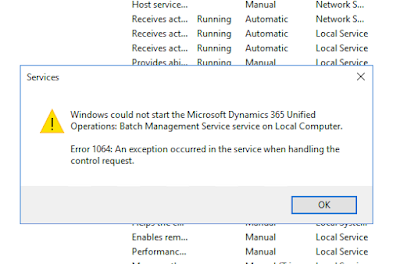
Recently while working with batch processing in Update8 I could not start the batch service.
It was working and at some point it stopped running. I used the handy Event Viewer to find out what the issue was.
The warning message in the Event Viewer shows that it's trying to start the BatchService in MaintenanceMode.

So I turned off maintenancemode with the following command:
J:\AosService\PackagesLocalDirectory\Bin\Microsoft.Dynamics.AX.Deployment.Setup.exe --metadatadir J:\AosService\PackagesLocalDirectory --bindir J:\AosService\PackagesLocalDirectory\Bin --sqlserver . --sqldatabase axdb --sqluser axdbadmin --sqlpwd ********* --setupmode maintenancemode --isinmaintenancemode false
Reference: https://docs.microsoft.com/en-us/dynamics365/unified-operations/dev-itpro/sysadmin/maintenance-mode
And it starts running...
I've been using Event Viewer more often now to make sense of runtime errors that are too vague.
It was working and at some point it stopped running. I used the handy Event Viewer to find out what the issue was.

The warning message in the Event Viewer shows that it's trying to start the BatchService in MaintenanceMode.

So I turned off maintenancemode with the following command:
J:\AosService\PackagesLocalDirectory\Bin\Microsoft.Dynamics.AX.Deployment.Setup.exe --metadatadir J:\AosService\PackagesLocalDirectory --bindir J:\AosService\PackagesLocalDirectory\Bin --sqlserver . --sqldatabase axdb --sqluser axdbadmin --sqlpwd ********* --setupmode maintenancemode --isinmaintenancemode false
Reference: https://docs.microsoft.com/en-us/dynamics365/unified-operations/dev-itpro/sysadmin/maintenance-mode
And it starts running...
I've been using Event Viewer more often now to make sense of runtime errors that are too vague.

Comments
Post a Comment