Posts

Showing posts with the label D365O

Exploring Alternatives for SELECT TOP in X++ - D365 Finance and Supply Chain

Image
Recently, I had to write a query that retrieves Batches with the oldest Manufacturing Date in D365 Finance and Supply Chain, utilizing the "SELECT TOP" functionality. However, as you may be aware, the TOP keyword is natively supported in SQL but not when composing a select statement in D365 and X++. Nevertheless, there are alternative techniques to accomplish the same objective. Additionally, I have included some performance metrics to assist you in choosing the most appropriate method based on your specific requirements. Scenario : Write a query to get the top 3 batches and locations which have the oldest Manufacturing Date for an item and have Available Physical > 0, grouped by the Item, Batch Id, Manufacturing Date and the location. Assumptions : One legal entity, with one site and warehouse Here's how the SELECT TOP Clause would look like in SQL: Method 1 : Select statement using a break  Once we reach the required number of records, we break from th...
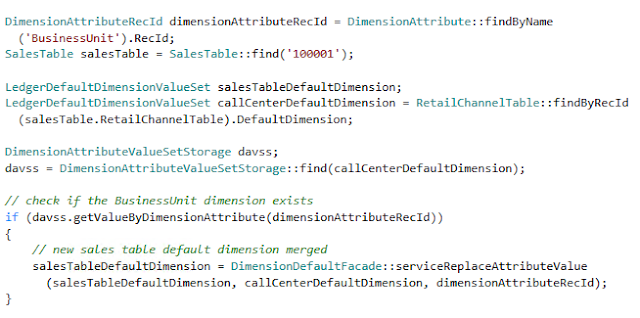
Validate if a particular Financial Dimension is not null in #MSDyn365FO

Image
In this example, I'm just checking if the "BusinessUnit" dimension is not null or empty.

Get the primary index of a table in X++

Image
Simple method gets you the Primary key index of any table:

HardwareStationSamples error RetailSDK Version 10

Image
While running an MSBUILD on RetailSDK in version 10 I came across an error that didn’t make sense because I wasn’t using it at all. This particular HardwareStationSamples solution would not build in the SampleExtensions . After a little bit of research I found out that the reference was in fact a CRT project. The Assembly prefix had changed to the one I had set up in my customization settings in my BuildTools folder hence the dll name was different. I changed it back to Contoso and rebuilt the CRT solution: CommerceRuntimeSamples.sln, under RetailSdk\SampleExtensions\CommerceRuntime I ran MSBUILD once again… no errors this time around.

Use Dev box as a Build Server in #MSDyn365FO

Image
You will need the following information to run the PowerShell script on your development machine: - ProjectCollection: https://yoursourcecontrol.visualstudio.com/DefaultCollection - AosWebsiteName: "AOSService" - VSOAccessToken: "yourToken" - AgentPoolName: "Default" 1. Open up PowerShell in Administrator mode, change directory to C:\DynamicsSDK and run this command: .\SetupBuildAgent.ps1 -VSO_ProjectCollection https://yoursourcecontrol.visualstudio.com/DefaultCollection -AosWebsiteName "AOSService" -VSOAccessToken "yourToken" -AgentPoolName "Default" This will download the Build agent onto your development environment. 2. Now create a build definition for the project .\BuildEnvironmentReadiness.ps1 -VSO_ProjectCollection https://yoursourcecontrol.visualstudio.com/DefaultCollection -ProjectName "YourProjectName" -VSOAccessToken "yourToken" -AosWebsiteName "AOSService" Yo...

Create and add to a blob storage in MSDyn365FO

Image
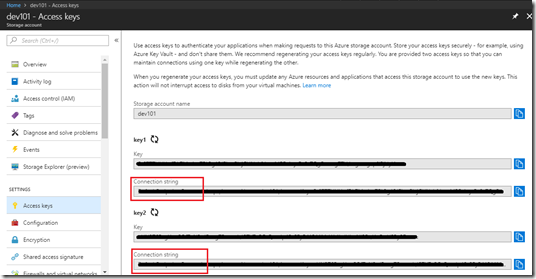
This post shows how you can create a Azure blob storage and add files using your Azure storage account from D365FO. I have created a job that finds an attachment on a sales order and uploads it to the Azure blob storage just to show how a simple scenario could work. To begin with, you will need to create your storage account. You can have a look at this article on how to create a blob storage account: Create a storage account Once you have created a storage account you will need the connection string. See below: Next thing is the job. I’ve pasted screenshots below: Once you run the above job and file upload is successful. You’ll find a container named ‘mycontainer’ inside your Azure blob storage and a document that you would have attached on the Sales order record.

Printing PDF Attachments in MSDyn365FO

Image
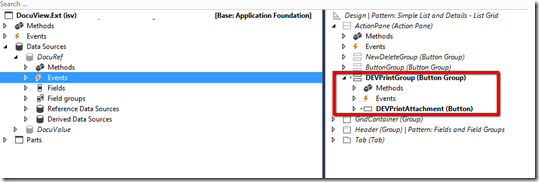
In this post I’ll detail how you can print PDF document attachments using AXs DocumentContract framework. I have used this forum post as a reference: https://community.dynamics.com/ax/f/33/p/222925/785091#785091 1. Create extension of the DocuView form to introduce a new Print button. 2. Next thing is to create a handler class that will have all our event handlers. a. Firstly, we create a class with the reference to DocumentContract AX framework. In my case, I am also using Reporting framework. b. Let’s subscribe to the OnActivated event of the main DataSource which is DocuRef. This is so we can enable or disable printing by checking if the reference is a document and is of type ‘pdf’ c. Then we can create subscribe to the OnClicked event of the new button Print button. We will write our printing logic here. d. Once you click print, you’ll get the following message and you have managed to successfully print an attachment:

Write to a CSV file and save it

Image
This is a simple job I wrote in D365O that writes all customers where the DataAreaId is “USRT” to a CSV file and downloads it. When you run the job you will be prompted to save the file. Your saved file as CSV:

Change joinSource using event-handlers on form datasource

Image
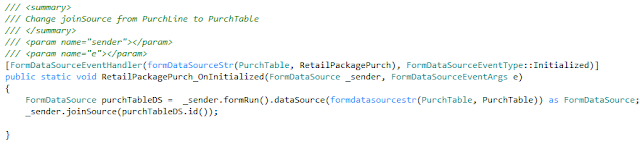
Recently, I came across a requirement where I needed to change the join source on the RetailPackagePurch datasource of the PurchTable form from PurchLine to PurchTable . Standard showed the product package based on the selected purchase order line. Our goal was to show all product packages associated with the purchase order. This is the code that did the job:

Solution to Ax Batch Service Exception with the help of Event Viewer

Image
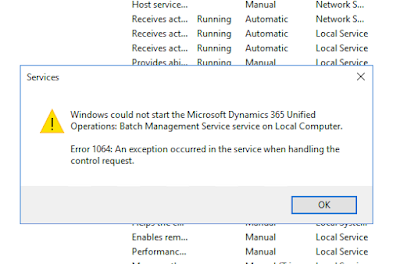
Recently while working with batch processing in Update8 I could not start the batch service. It was working and at some point it stopped running. I used the handy Event Viewer to find out what the issue was. The warning message in the Event Viewer shows that it's trying to start the BatchService in MaintenanceMode. So I turned off maintenancemode with the following command: J:\AosService\PackagesLocalDirectory\Bin\Microsoft.Dynamics.AX.Deployment.Setup.exe --metadatadir J:\AosService\PackagesLocalDirectory --bindir J:\AosService\PackagesLocalDirectory\Bin --sqlserver . --sqldatabase axdb --sqluser axdbadmin --sqlpwd ********* --setupmode maintenancemode --isinmaintenancemode false Reference: https://docs.microsoft.com/en-us/dynamics365/unified-operations/dev-itpro/sysadmin/maintenance-mode And it starts running... I've been using Event Viewer more often now to make sense of runtime errors that are too vague.

Override a System Defined Refresh button in D365O

Image
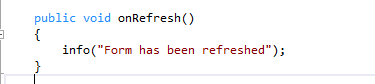
Essentially this post is going to discuss calling custom code while refreshing a form in D365O, however, you can find more information about other system defined buttons and how you can run extra code or suppress them in this article:  System-Defined buttons Firstly the datahelper() method of the formRun framework class can be used to provide services that allow managing the datasources of the form. How can I add custom code to run when I click refresh? We are going to use eventing (pre-event handler and post-event handler) to do this: 1. Write your method that you want to call when the refresh button is clicked 2. In the Form.int subscribe using the datahelper().Refreshing event 3. On refresh click you'll see your message

Right-Click Context Menu in D365O on a Tree control

Image
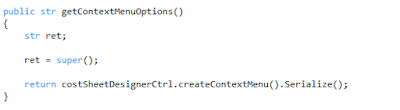
AX 2012 used the PopupMenu class to create a right-click context menu. In D3650, Microsoft has done away with that and introduced the ContextMenu API which can be used to do the same thing. You can override the form control methods and use the  getContextMenuOptions  to create context menu options and override the  selectedMenuOption method  to select the menu options. Demo: AOTName - CostSheetDesigner form CostsheetDesignerCtrl is a class that helps to creates the context menu options "Cut", "Copy" and "Paste" in the createContextMenu and allows selection in selectContextMenuOption methods. Override form control method To create menu options in the CostsheetDesignerCtrl class Now for the selection: Override form control method Calls this method in the CostSheetDesignerCtrl class And the Right-click context menu in the form with the "Cut" and "Copy" options:

Dimension Entry Controls in Dynamics 365 for Operations

Image
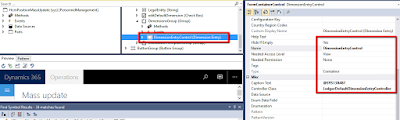
In Dynamics 365 for Operation adding dimension controls to Forms has been changed a bit so that all forms interact only with the Dimension Entry control instance API and not directly with the controller classes eg. LedgerDefaultDimensionEntryController, etc. These are some of the changes I've noticed while upgrading Ax 2012 to D365FO: 1. Add the Dimension Entry form control and set the properties 2. While upgrading these are some of the differences I found between Ax 2012 and D365FO: Ax 2012 dimensionDefaultingController = DimensionDefaultingControllerNoDS::constructInGroupWithValues(true, true, true, 0, this, dimensionsGroup, "@SYS138487", legalEntity.text()); D365FO DimensionEntryControl.parmDisplayValues(true); DimensionEntryControl.parmCompany(legalEntity.text()); DimensionEntryControl.reactivate(); Ax 2012 dimensionDefaultingController.pageActivated(); dimensionDefaultingController.loadValu...