Posts

Printing PDF Attachments in MSDyn365FO
Image
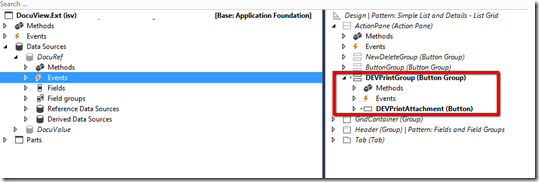
In this post I’ll detail how you can print PDF document attachments using AXs DocumentContract framework. I have used this forum post as a reference: https://community.dynamics.com/ax/f/33/p/222925/785091#785091 1. Create extension of the DocuView form to introduce a new Print button. 2. Next thing is to create a handler class that will have all our event handlers. a. Firstly, we create a class with the reference to DocumentContract AX framework. In my case, I am also using Reporting framework. b. Let’s subscribe to the OnActivated event of the main DataSource which is DocuRef. This is so we can enable or disable printing by checking if the reference is a document and is of type ‘pdf’ c. Then we can create subscribe to the OnClicked event of the new button Print button. We will write our printing logic here. d. Once you click print, you’ll get the following message and you have managed to successfully print an attachment:

Write to a CSV file and save it

Image
This is a simple job I wrote in D365O that writes all customers where the DataAreaId is “USRT” to a CSV file and downloads it. When you run the job you will be prompted to save the file. Your saved file as CSV:

Change joinSource using event-handlers on form datasource

Image
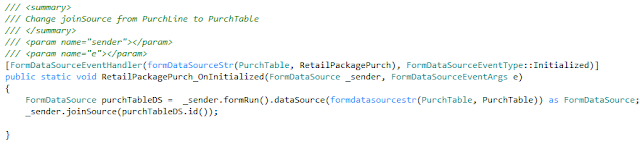
Recently, I came across a requirement where I needed to change the join source on the RetailPackagePurch datasource of the PurchTable form from PurchLine to PurchTable . Standard showed the product package based on the selected purchase order line. Our goal was to show all product packages associated with the purchase order. This is the code that did the job:

Solution to Ax Batch Service Exception with the help of Event Viewer

Image
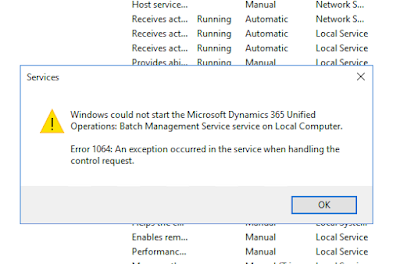
Recently while working with batch processing in Update8 I could not start the batch service. It was working and at some point it stopped running. I used the handy Event Viewer to find out what the issue was. The warning message in the Event Viewer shows that it's trying to start the BatchService in MaintenanceMode. So I turned off maintenancemode with the following command: J:\AosService\PackagesLocalDirectory\Bin\Microsoft.Dynamics.AX.Deployment.Setup.exe --metadatadir J:\AosService\PackagesLocalDirectory --bindir J:\AosService\PackagesLocalDirectory\Bin --sqlserver . --sqldatabase axdb --sqluser axdbadmin --sqlpwd ********* --setupmode maintenancemode --isinmaintenancemode false Reference: https://docs.microsoft.com/en-us/dynamics365/unified-operations/dev-itpro/sysadmin/maintenance-mode And it starts running... I've been using Event Viewer more often now to make sense of runtime errors that are too vague.

Override a System Defined Refresh button in D365O

Image
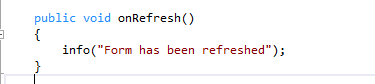
Essentially this post is going to discuss calling custom code while refreshing a form in D365O, however, you can find more information about other system defined buttons and how you can run extra code or suppress them in this article:  System-Defined buttons Firstly the datahelper() method of the formRun framework class can be used to provide services that allow managing the datasources of the form. How can I add custom code to run when I click refresh? We are going to use eventing (pre-event handler and post-event handler) to do this: 1. Write your method that you want to call when the refresh button is clicked 2. In the Form.int subscribe using the datahelper().Refreshing event 3. On refresh click you'll see your message

Right-Click Context Menu in D365O on a Tree control

Image
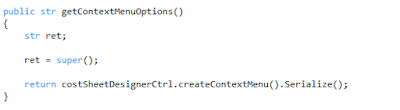
AX 2012 used the PopupMenu class to create a right-click context menu. In D3650, Microsoft has done away with that and introduced the ContextMenu API which can be used to do the same thing. You can override the form control methods and use the  getContextMenuOptions  to create context menu options and override the  selectedMenuOption method  to select the menu options. Demo: AOTName - CostSheetDesigner form CostsheetDesignerCtrl is a class that helps to creates the context menu options "Cut", "Copy" and "Paste" in the createContextMenu and allows selection in selectContextMenuOption methods. Override form control method To create menu options in the CostsheetDesignerCtrl class Now for the selection: Override form control method Calls this method in the CostSheetDesignerCtrl class And the Right-click context menu in the form with the "Cut" and "Copy" options:

New Print Destination in Dynamics 365 for Operations

Image
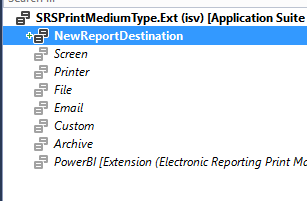
A customization may require you to add a new report print destination. With the help of delegates and extensions it's quite simple to achieve that in D365FO: 1. Create an extension of the BaseEnum SRSPrintMediumType and add your new report destination: 2. Create your class which will have your customization relating to your new destination. Now subscribe to the delegate method onPrintReport in SRSPrintDestinationSettingsDelegates class and add your custom code: 3. Create an extension for SRSPrintDestinationSettingsForm and add your tabpage for your new destination: 4. Next thing is to add the code that will build your destination Tabpage and your destination list. This can be done by subscribing to the delegate methods in SRSPrintDestinationSettingsDelegates class: Code for print medium type change event on the destination form Code for building SendTo list control on the destination form Code for the index selection ...